Web design for storage facilities

Websites that help renters choose the right unit.

Nobody plans to need storage. A renovation, a divorce, a move with a gap between closings, or a boat with nowhere to go sends people searching, usually with no idea what size unit they need.

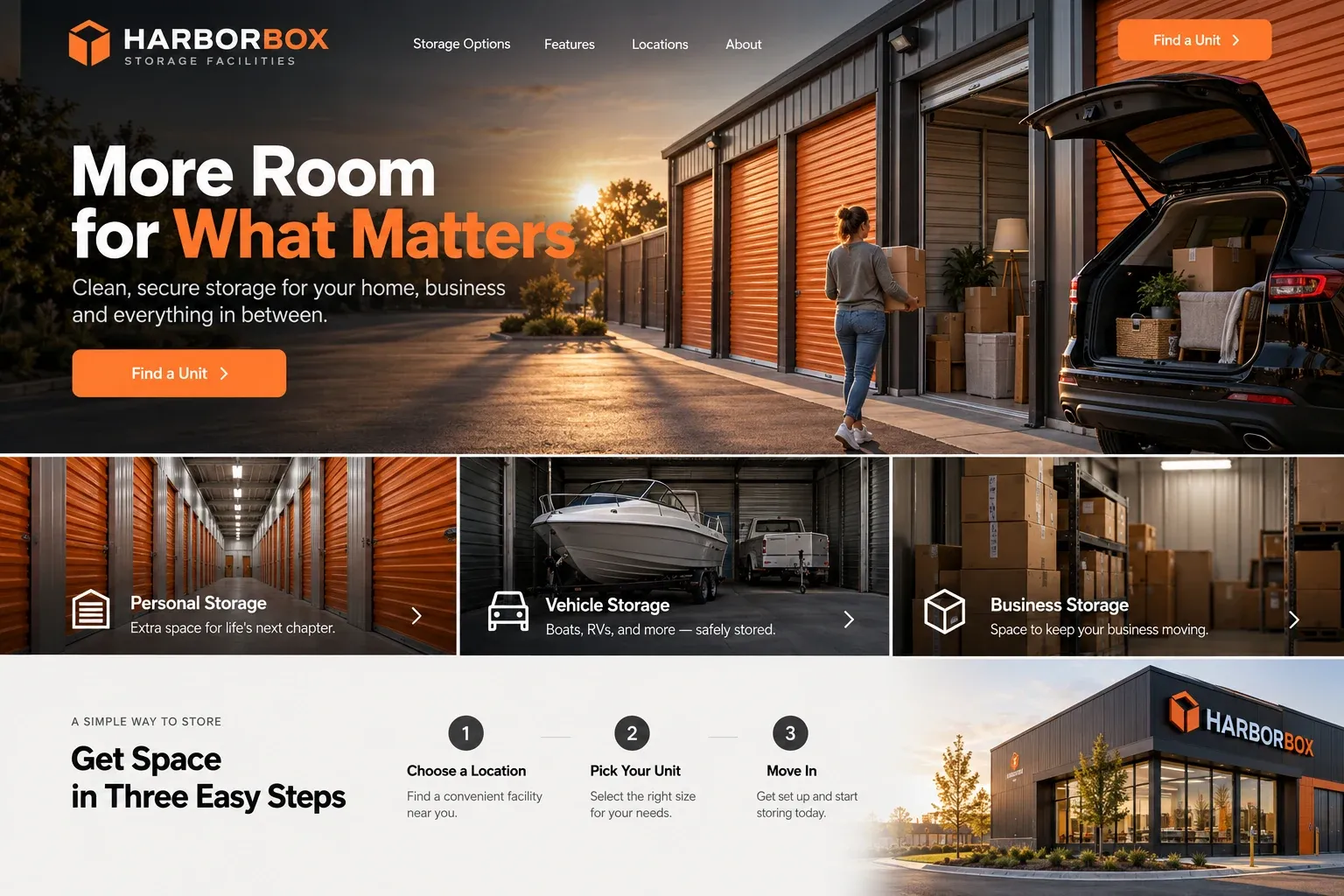
Fictional storage facilities website homepage design concept
A design concept for a fictional brand. Your site is designed from scratch around yours.

Your customer's story

Three months of renovation, one living room

Nadia and Felipe finally start the renovation they have saved for, and the contractor's first instruction is simple: everything out of the living room, dining room, and kitchen for about three months. Their garage is already full. On Sunday they stand among the furniture with a tape measure, trying to picture it stacked in a metal box, and Felipe searches "storage units near me" on his phone.

Most facility pages show a row of orange doors and a list of sizes in feet that mean nothing to them. One facility does it differently. Its size guide shows each unit with furniture drawn in: a one-bedroom apartment, a dining set and sofa, a garage's worth of tools. It explains climate control, gate hours, and what cannot be stored, and shows which sizes are available today.

They pick a climate-controlled unit, because the dining table is old mahogany and the summer is long, and reserve it online in a few minutes. A storage facility's website should answer, in plain terms, the questions people rush through when they need space fast: what size, which features, what terms, and how to get in, all before anyone drives over.

Why it matters

Why storage facilities need a website.

Storage is chosen fast and by location, but renters still compare. They search on a phone, look at the nearest few facilities, and pick the one that makes size, price, access, and terms easiest to understand. National aggregator sites list facilities side by side with little room for what makes yours different, such as climate control, drive-up units, boat and RV parking, or staff on site. Your own website can show all of it.

We build storage facility websites around the unit size guide. Each size is shown with what typically fits, along with whether it is climate-controlled or drive-up. Access hours, gate and security features, rental terms, and restricted items are explained plainly. Current availability, reservations, and payments connect to your management software's own pages, so the site stays accurate without anyone retyping unit lists.

What your customers search for

  • storage units near me
  • climate controlled storage Miami
  • boat storage Miami
  • small storage unit
  • self storage near me
  • business storage units

Your customers

What renters ask before choosing a storage unit

  • What size do I actually need?

    A visual size guide showing what fits in each unit, from a few boxes and a bike to the contents of a three-bedroom house.

  • Will my things survive the humidity?

    A plain explanation of climate-controlled units, which items benefit from them, and how they differ from standard and drive-up units at your facility.

  • When can I get to my unit?

    Gate hours, office hours, and how access works, such as keypad codes or app entry, stated clearly on every location page.

  • What am I signing up for?

    Rental terms in everyday words: month-to-month or longer, move-in steps, required protection or insurance if any, and how to give notice.

What we build

What a website for storage facilities should include.

  • Unit size guide

    Each unit size shown with typical contents, so renters can match their belongings to a space without guessing.

  • Unit type pages

    Climate-controlled, drive-up, vehicle, boat, and business storage, each explained with who it suits best and what it includes.

  • Access and security

    Gate hours, entry method, cameras, lighting, and on-site staff described exactly as they exist at your facility.

  • Rental terms page

    Move-in steps, payment options, protection plans, restricted items, and move-out notice, written in plain language.

  • Availability and reservations

    Links or embeds from your management software, so renters see current units and reserve or pay online.

  • Location pages

    A page per facility with map, directions, hours, photos, and nearby neighborhoods, for operators with more than one site.

Planning guide

What should a self storage facility's website include?

A storage website works best when it behaves like a patient leasing manager: it helps people estimate the space they need, explains the options and terms, and lets them reserve without a phone call if they want. Here is how we structure a storage facility's site, what to show, how renters reserve, and how it gets found nearby.

Make the size guide the centerpiece

Most renters cannot picture a unit from its dimensions. Show each size with what typically fits: a dorm room's worth of boxes, a one-bedroom apartment, a family home, a car. Simple illustrations or real photos of loaded units work well. Add a short note that needs vary, and invite visitors to call if they are between sizes rather than guess.

Real photos of the property matter as much as the guide. Show the gate, the clean hallways, the loading area and elevator, carts and dollies, and the office, in daylight. Renters are trusting you with their belongings, and a well-kept property in photos answers questions they may not think to ask.

Explain unit types, access, and terms

Give each unit type its own short page or section: climate-controlled, standard, drive-up, vehicle and boat parking, and business storage. Explain who each one suits and what it includes. Then describe access exactly as it works, including gate and office hours, how entry codes are issued, and what security features the property really has.

Rental terms deserve plain words. Cover move-in steps, payment options, any required protection plan or proof of insurance, late payment policies, and how to give notice. List restricted items, such as flammables, perishables, and anything alive. Renters who understand the rules up front are easier customers, and the clarity helps them choose you over a vaguer competitor.

Connect to live availability

Unit lists change daily, so do not retype them into the website. Many storage management systems offer online rental, reservation, and payment pages that can be linked or embedded, so renters see current availability and existing tenants can pay without calling. Where online rental is not set up, an availability inquiry asking for size, unit type, and move-in date works well.

Win the nearby search

Storage is a close-to-home search: most people want space within a few miles. Give each location its own page with a map, directions from main roads, hours, and photos of the property. Keep details consistent with each Google Business Profile, and ask new tenants for reviews after move-in. Clear unit and location pages give search engines what they need to match nearby renters.
In your market

Built for self storage in South Florida

Humidity is the first question here, so climate-controlled units, and how they are described, matter for furniture, documents, and electronics. Hurricane season brings questions about building construction, flood zones, and access during storms. Boat and RV storage is in steady demand, seasonal residents store belongings between visits, and condo dwellers rarely have garages. We write unit and location pages around these needs and can add a Spanish version of the site.

Questions

Questions storage facilities ask us.

Can our storage site show live unit availability?

Yes, by linking or embedding the online rental pages from your storage management software, which stay current as units rent. We do not retype unit lists into the site, since they would go stale quickly. Rates display however your software and your policies allow.

How do we explain climate-controlled storage without overselling it?

Describe what your climate-controlled units actually do, such as keeping temperature within a range or managing humidity, based on your equipment. Name the items that benefit, like wood furniture, photos, and documents, and avoid promises about protection you cannot measure. You approve the exact wording.

We run several storage locations. Does each need its own page?

Yes. Each facility should have a page with its address, map, hours, unit types, photos, and a link to rent at that location. Renters search for storage near a specific neighborhood, and separate pages, each tied to its own Google Business Profile, match those searches better.

Should a storage facility list what cannot be stored?

Yes, clearly. A short restricted items list, such as flammable liquids, perishable food, and hazardous materials, prevents awkward conversations at move-in and protects other tenants. We place it on the rental terms page and link it from the size guide and reservation button.

Let's talk

Ready for a website built for storage facilities?

Tell us about your business and we will come back with a clear recommendation and a fixed quote. No pressure, no jargon.

Trades we design for

See all 226 trades

226 trades

  • Plumbers website design concept
CallFree quote