Web design for podiatrists

Website design for podiatrists.

Foot pain changes how a person walks, works, and sleeps, and it rarely waits for a convenient week. Patients searching for a podiatrist want the problem named, the doctor introduced, and a door they can reach without a long walk.

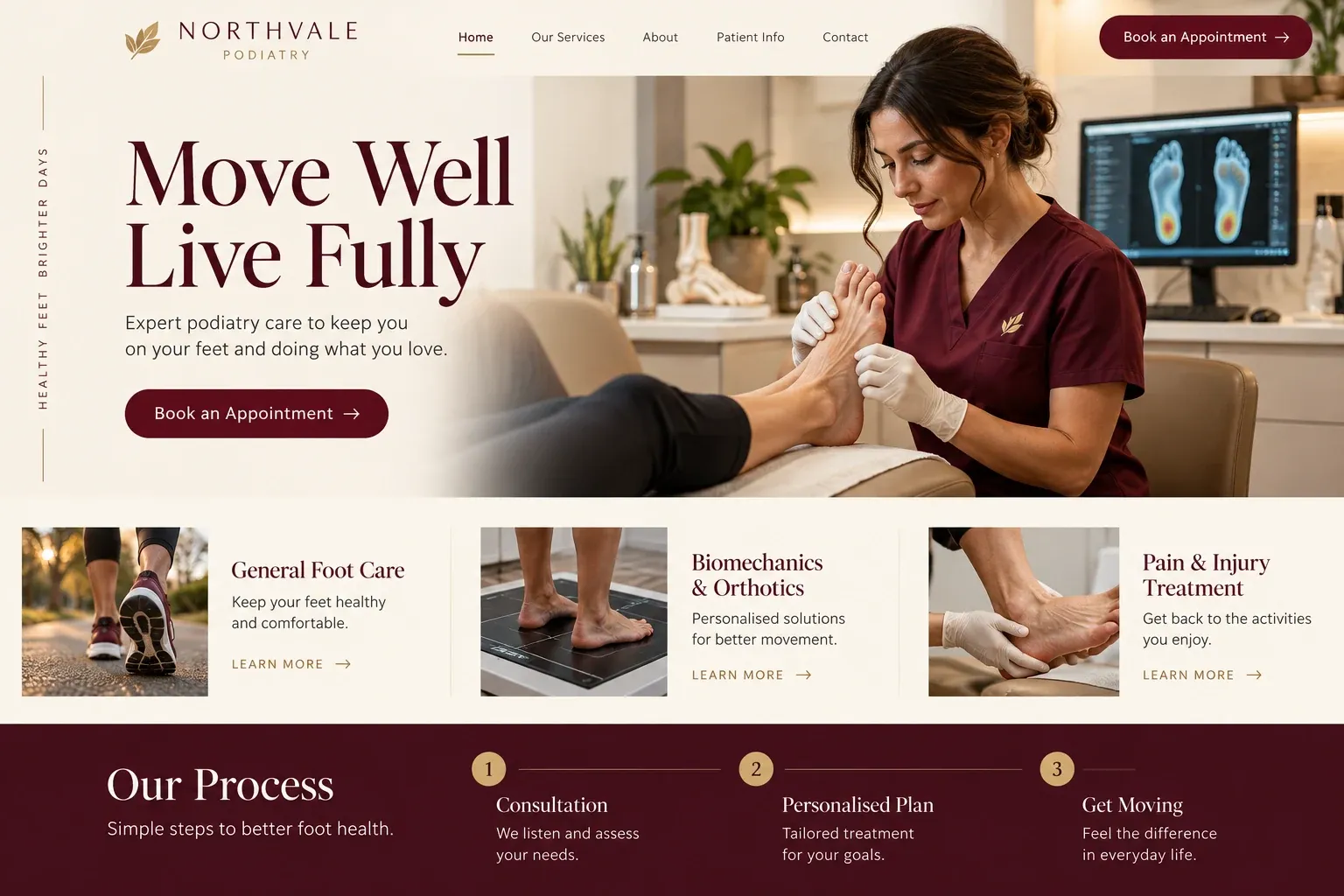
Fictional podiatrists website homepage design concept
A design concept for a fictional brand. Your site is designed from scratch around yours.

Your customer's story

Heel pain on the first step every morning

Every morning for three weeks, Gloria's first step out of bed feels like stepping on a nail. She is a nurse who works twelve-hour shifts on her feet, and new shoes have not helped. On her lunch break she sits in the hospital cafeteria and searches "heel pain doctor near me", then "foot doctor open Saturday", scrolling with one hand while she eats with the other.

One practice opens to a slideshow of smiling runners and a page called Services with no services listed. Another has every foot condition ever named in a long, unlinked block of text. A third has a short page on heel pain in plain language, a photo and a few lines about each doctor, the insurance plans it accepts, and a note that the office is on the ground floor with parking at the door.

That last detail matters more than anyone at the practice might guess, because the walk from a parking garage is the hard part for Gloria right now. She taps the booking link and chooses a Saturday slot. A podiatry website wins visits like hers by answering the practical questions first: what you treat, who will see me, when, and how far I will have to walk.

Why it matters

Why podiatrists need a website.

Podiatry patients search by symptom and by situation: heel pain, an ingrown toenail, a bunion, the diabetic foot check their doctor told them to book, a child who walks on tiptoe. Many are older, many are hurting, and nearly all are on phones. A directory listing gives a name and a star rating, but it cannot explain which conditions you treat, which doctor fits, or how easy it is to get through the door.

We build podiatry sites around those practical questions. Conditions and treatments get their own pages, written from your notes in plain words and approved by the doctors, without promising results. Each clinician has a profile with training and special interests. Office access, parking, and what to bring sit near the booking button, and the request form asks for contact details and a preferred time, never symptoms or history.

What your customers search for

  • podiatrist near me
  • foot doctor Miami
  • heel pain treatment
  • ingrown toenail removal
  • diabetic foot care podiatrist
  • custom orthotics

Your customers

What patients check before booking a podiatrist

  • Do you treat what I have?

    A page for each common reason people visit, such as heel pain, ingrown nails, bunions, diabetic foot care, and sports injuries, in everyday language.

  • Which doctor should I see?

    Clinician profiles with training, board certification where it applies, special interests like wound care or children's feet, and the languages each one speaks.

  • How hard is it to get inside?

    Parking, elevators, entrances, and wheelchair access described plainly, because many podiatry patients arrive limping, on crutches, or in a walking boot.

  • Can I come in soon?

    Your booking link or request form near the top, with a note on short-notice visits for problems like a painful ingrown nail, if you offer them.

What we build

What a website for podiatrists should include.

  • Condition and treatment pages

    Plantar fasciitis, ingrown nails, bunions, neuromas, fungal nails, and diabetic foot exams, each explained briefly and approved by your doctors.

  • Clinician profiles

    Training, residency, interests, languages, and a friendly photo, so patients can choose the podiatrist who fits their concern.

  • Office access details

    Parking, entrances, elevators, and walking distance for each location, with a map and directions that open on a phone.

  • Preparation notes

    What to bring, such as the shoes worn most often, insurance cards, and a medication list, written by your own staff.

  • Orthotics and footwear page

    How custom orthotics are made in your office, plus any shoes, braces, or supplies you stock for patients to buy.

  • Online booking link

    Your practice software's scheduler embedded or linked, or a request form that asks only for name, phone, and preferred time.

Planning guide

What should a podiatry practice's website show patients first?

Patients come to a podiatry website with sore feet and practical questions. The site should tell them quickly what you treat, who will see them, where to park, and how to book, and then offer deeper pages for those who want to read. Here is how we lay out a podiatry site and how it helps the practice get found.

Build a clear directory of conditions

Organize the site the way patients think: by the problem. A short directory page links to one page per condition or service, from heel pain and ingrown toenails to bunion surgery, wound care, and children's foot problems. Each page explains in plain terms what the condition is, how a visit usually goes, and which doctor sees it. The doctors approve every line, and no page promises an outcome.

Introduce every podiatrist properly

Patients choosing a foot surgeon, or a doctor for a child, want to know who they will see. Give each podiatrist a profile with a real photo, training, any board certification they actually hold, hospital affiliations, interests, and languages. Group practices can add a line on who handles sports injuries, wound care, or surgery, so new patients book with the right person the first time.

Make the visit easy to plan

Put the booking button where people expect it and make it work on a phone. If your practice software offers online scheduling, link it or embed it. Otherwise a short request form collects a name, a phone number, and a preferred day, never symptoms or medical history, and your front desk calls back. Show the phone number in large type for patients who would rather call.

Then answer the questions that come up the night before. Where do I park, and how far is the walk? Is there an elevator? What should I bring and wear? Do you see walk-ins? Practical answers, written by your staff, settle small worries before the visit and spare your front desk the same calls every morning.

Help nearby patients find each location

Most people want a podiatrist close to home. Give each office its own location page with the address, hours, parking, and a map, and match those details exactly to each Google Business Profile. Condition pages help the practice appear for specific searches like heel pain or ingrown toenail. Ask patients for reviews after visits, and show them on the site. No website can promise a ranking, but this structure gives search engines what they need.

In your market

Built for podiatry in South Florida

South Florida has a large population of older adults, and many live with diabetes, so routine foot care is a regular appointment for a lot of patients. Year-round sandals, beach walking, and long days on hard floors in hospitality jobs bring people in too. Many patients prefer Spanish, and seasonal residents want a podiatrist for the winter months. We put languages, building access, and accepted plans up front, and can build the whole site in Spanish as well.

Questions

Questions podiatrists ask us.

Should our podiatry site have a page for every foot condition?

Not every one. Start with the conditions you see most and want to see more of, such as heel pain, ingrown nails, bunions, diabetic foot care, and sports injuries. Each gets a plain page your doctors approve. Rarer conditions can sit together on a general page, and we add individual pages later as you request them.

Can we show bunion or nail photos from before and after treatment?

Only with each patient's written permission, and only images you supply. We label every one as an individual result, add no claims about what other patients should expect, and keep faces and identifying details out of frame. Some practices skip clinical photos entirely and show the office, the team, and the equipment instead.

Can the site explain what to bring to a first podiatry visit?

Yes. Your staff gives us the list, and we turn it into a short page linked from the contact page and the booking button: insurance cards, a medication list, the shoes worn most often, any orthotics, and referral paperwork if a plan requires it. It is written in plain words and can be published in Spanish too.

Will our podiatry website be easy for older patients to use?

We build with large, clear type, strong contrast, simple menus, and buttons big enough to tap easily, which suits many older podiatry patients. Phone numbers dial with one tap, maps open in the phone's own app, and nothing important hides behind small icons or moving slideshows.

Let's talk

Ready for a website built for podiatrists?

Tell us about your business and we will come back with a clear recommendation and a fixed quote. No pressure, no jargon.

Trades we design for

See all 226 trades

226 trades

  • Plumbers website design concept
CallFree quote