Web design for security system installers

Websites that start with the property, not the hardware.

Customers rarely know which cameras, sensors, or access systems they need. They are choosing an installer to advise them, so your website should start with their property and their worries, not a catalog of model numbers.

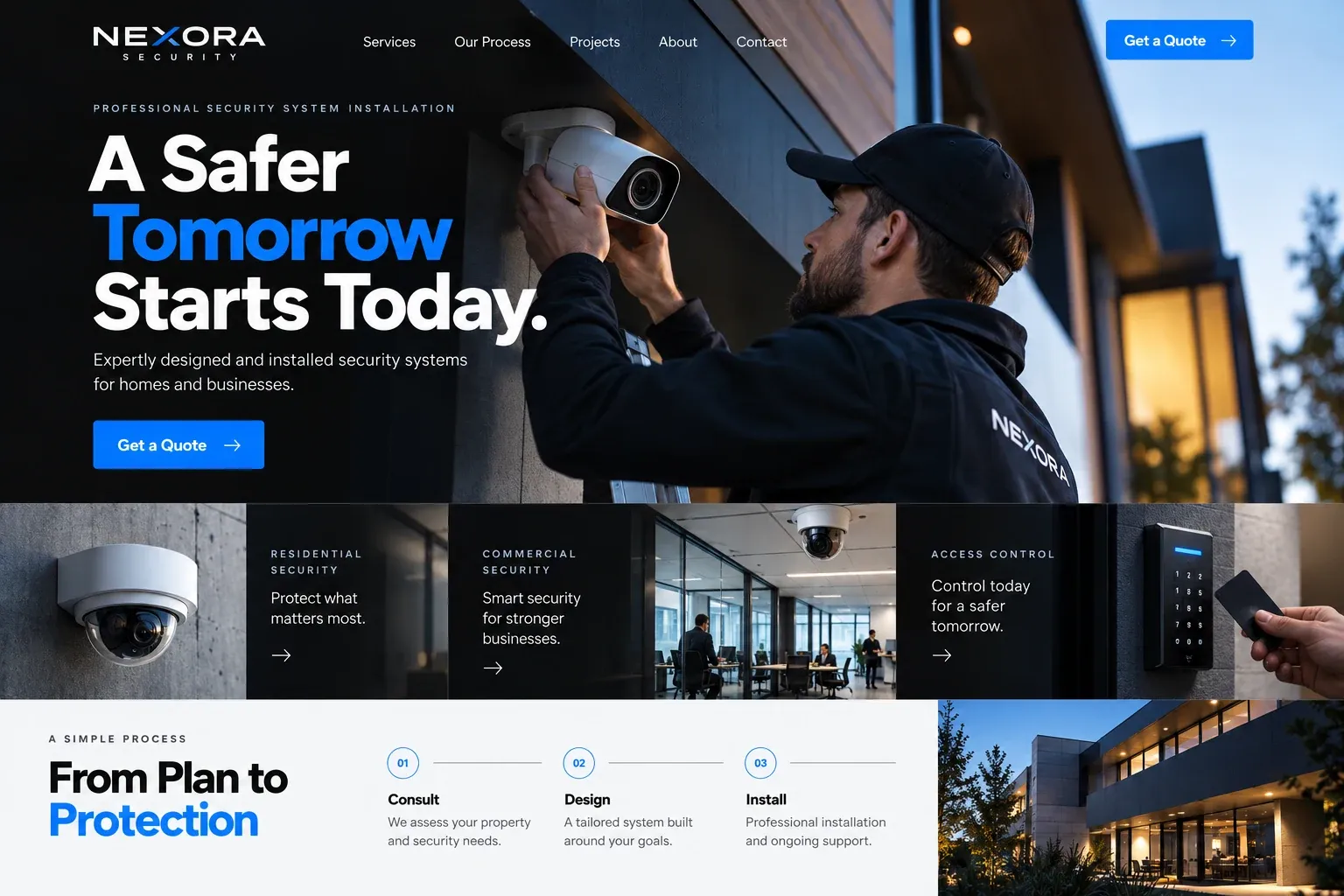
Fictional security system installers website homepage design concept
A design concept for a fictional brand. Your site is designed from scratch around yours.

Your customer's story

Missing stock and no footage to check

Farida runs a phone accessories shop in a strip mall in Doral. Twice this year, boxes have gone missing from the stockroom, and the single camera above the register shows nothing useful. Her insurance agent suggests a proper system. She has no idea whether she needs more cameras, an alarm, door sensors, or all three, and she does not want to be sold a pile of equipment.

At night she reads installer websites. Most list cameras by resolution and lens size, next to prices for hardware she does not understand. One begins with property types: retail, offices, warehouses, homes. Its retail page talks about entrances, registers, stockrooms, and after-hours alerts, shows cameras mounted in real shops, and explains a site survey before any equipment is chosen. A short form asks about her space.

Farida books the survey. What persuaded her was not a list of features but a page that thought about a shop like hers. A security installer's website should show the system in context, explain the survey, design, installation, and handover, and stay honest that no system removes every risk. That honesty is part of why she trusted it.

Why it matters

Why security system installers need a website.

Security systems are bought by people who know their problem but not the solution: a break-in nearby, missing stock, a new home, a business that needs to control who goes where. They search, compare a few installers, and look for one who will listen. Manufacturer brochures and a directory listing cannot show how you design around a property or explain monitoring, remote viewing, and service after installation.

We build security installer websites that begin with the property. Visitors choose homes, retail, offices, or warehouses and find the goals, typical equipment, and photos that fit. A process page covers the survey, design, installation, training, and support. Monitoring and remote viewing are explained in plain words. The consultation form asks about the property and concerns, and the site never claims that any system stops every incident.

What your customers search for

  • security camera installation near me
  • home alarm system Miami
  • business security cameras
  • access control installation
  • security system installer Miami
  • wireless security cameras for home

Your customers

What owners ask before choosing a security installer

  • What does a place like mine need?

    Pages by property type that describe common goals, such as covering entrances, stockrooms, or a pool gate, and the equipment that usually fits.

  • Can I watch it from my phone?

    A plain explanation of the apps and remote viewing your systems use, with screenshots, so owners know what daily use looks like.

  • Who monitors the alarm?

    A monitoring page explaining whether you provide monitoring or partner with a central station, how alerts work, and what happens when one goes off.

  • What happens if something breaks?

    A service page covering warranty, repairs, and how to reach your team after installation, so the relationship does not end at handover.

What we build

What a website for security system installers should include.

  • Solutions by property type

    Separate pages for homes, condos, retail, offices, and warehouses, each describing goals before naming any equipment.

  • Site survey explainer

    What happens during your walk-through, what you measure and ask, and how the design and written proposal follow.

  • Equipment in real settings

    Cameras, sensors, keypads, and access readers shown installed in real properties, with captions in everyday language.

  • Monitoring and apps page

    How alerts reach the owner or a central station, what remote viewing looks like, and what the customer controls.

  • Security consultation form

    Property type, size, main concerns, and existing equipment, so your first survey visit starts with useful information.

  • License and support details

    Your license number, insurance, and support hours shown clearly, with a direct line for existing customers who need service.

Planning guide

How should a security system installer structure a website?

A security installer's website has to translate equipment into peace of mind without overpromising. Visitors arrive with a property and a worry, and they leave either confused by specifications or confident about a conversation. This guide covers the pages to build, what to show, how consultations should be requested, and how an installer gets found by nearby owners.

Start with properties and goals

Most buyers cannot compare cameras by sensor size, but they can describe their place. Organize the site by property type: homes, condos, retail shops, offices, restaurants, and warehouses. On each page, describe the usual goals, such as watching entrances, controlling after-hours access, or protecting a stockroom, then the equipment that tends to fit. Brand names and specifications can follow on secondary pages for readers who want them.

Show systems where they live

Photos of cameras mounted under eaves, keypads beside a back door, and a monitor in a manager's office show what an installation really looks like. Add screenshots of the phone app your systems use. Take care with privacy: avoid images that reveal a client's layout, address, or blind spots, and get permission for every photo you publish.

Be honest about limits. A good security site explains what cameras and alarms help with, such as deterrence, alerts, and evidence, without claiming any system prevents every break-in. List your license number and insurance where your state requires them, and describe the training your installers have. That calm, honest tone is what separates a trusted installer from a hardware seller.

Make the survey the next step

The consultation form should collect the property type, approximate size, main concerns, existing equipment, and the best time for a site visit. Explain what the survey involves and what the customer receives after it, such as a written proposal with a layout. Keep a phone number visible for those who prefer to talk, and give existing customers a separate support contact so service calls do not get lost among new inquiries.

Rank for the systems people search

Owners search for what they want: security camera installation, alarm system for business, access control installer, usually with their city or near me. Give each system type and each major property type its own page, list your service area, and keep the Google Business Profile consistent with the site. Reviews from homeowners and business owners both matter. Together these give an installer a fair chance to be found nearby, without any promised position.
In your market

Built for security installation in South Florida

Security work here covers condo towers with lobby access systems, gated communities, homes with pools and long side yards, and busy retail and warehouse districts. Hurricane season brings power outages, so customers ask about battery backup and how systems behave when the internet goes down. Salt air near the coast is hard on outdoor equipment. Many customers want to speak Spanish, and seasonal owners watch their homes from other states. We write pages for each situation and can add a Spanish version of the site.

Questions

Questions security system installers ask us.

Should our security site list camera brands and models?

List the brands you install and support, because some buyers look for them, but lead with property types and goals. Model numbers change often and confuse most visitors. We keep detailed specifications on secondary pages, so technical buyers can find them without overwhelming a homeowner who just wants to watch the driveway.

How do we show security installations without exposing clients?

Use photos that show equipment and workmanship without revealing addresses, interiors, or camera coverage gaps, and get written permission from each client. Close shots of clean cable runs, mounted cameras, and keypads work well. We review every image with you before it goes live, and remove any that feel too revealing.

Can existing security customers request service through the website?

Yes. We add a separate support page with your service number, hours, and a short form for existing customers, so repair requests do not mix with new sales inquiries. If your monitoring partner has its own customer portal, we link to it there as well.

Can the site explain alarm monitoring without promising too much?

Yes. We describe how monitoring works, who receives alerts, and what happens when an alarm goes off, in plain language. We avoid claims about response times or crime prevention, and you approve every line. Customers appreciate the honesty, and it protects your business from expectations it cannot meet.

Let's talk

Ready for a website built for security system installers?

Tell us about your business and we will come back with a clear recommendation and a fixed quote. No pressure, no jargon.

Trades we design for

See all 226 trades

226 trades

  • Plumbers website design concept
CallFree quote