Web design for bookkeepers

Website design for bookkeepers.

Owners call a bookkeeper when the receipts pile up, the bank feed is months behind, or their accountant sends a polite but firm email. They want to know what you will take off their plate.

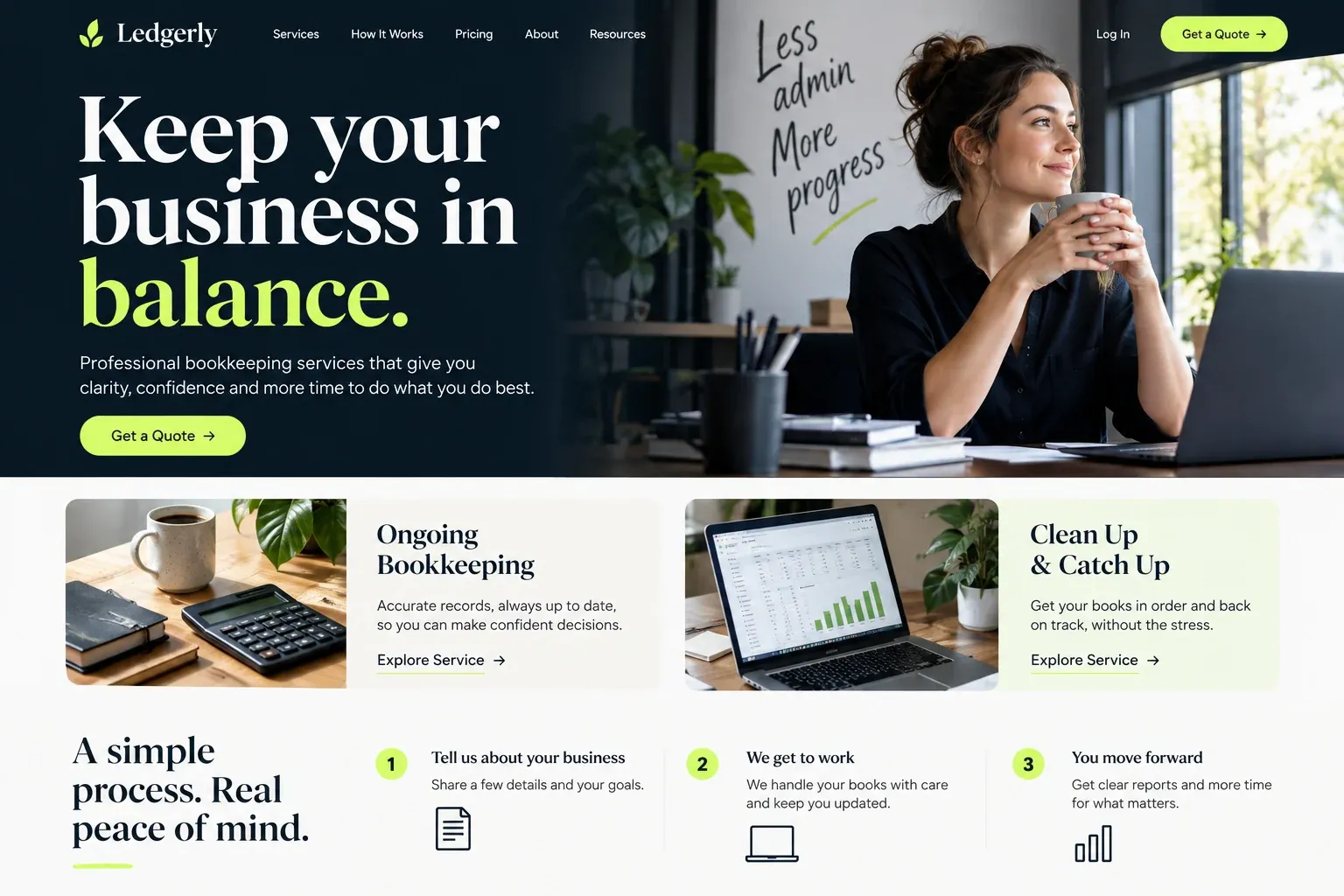
Fictional bookkeeping services website homepage design concept
A design concept for a fictional brand. Your site is designed from scratch around yours.

Your customer's story

Eleven months of receipts in a tote bag

Keisha runs a two-chair salon and a small line of hair products she sells online. Her receipts live in a tote bag, her email, and a payment app. In February her accountant asks for a profit and loss statement and reconciled bank accounts before he can start the return. She has neither, and she has been meaning to fix it since last spring.

That night she searches "bookkeeper for my business near me" and "catch up bookkeeping". Several sites talk about financial clarity and peace of mind without saying what the work is. One explains it in two columns: catch-up projects that bring old months up to date, and monthly bookkeeping that keeps them there. It names the software it works in, including the one she already pays for and never opens.

A short list tells her what she would still handle herself: sending receipts, answering a monthly question or two, approving payments. The inquiry form asks how many accounts she has and how far behind she is, not for statements. She sends it before bed. A bookkeeper's website earns that message by making the work feel finite, specific, and already halfway organized.

Why it matters

Why bookkeepers need a website.

Bookkeeping is easy to put off and hard to buy, because most owners do not know where the job begins or ends. They search when a deadline or a lender forces the issue, and they compare bookkeepers on three things: whether you work in their software, whether you take on messy catch-up work, and what they will still have to do each month. A social profile or directory listing answers none of those.

We build bookkeeping websites that draw the edges of the work clearly. Monthly services and catch-up projects get separate pages, each listing what you do and what the client provides. The software you work in is named plainly. An onboarding page explains how access is shared and how documents move through your portal or app, and the inquiry form asks about the current setup, never for bank logins or statements.

What your customers search for

  • bookkeeper near me
  • bookkeeping services Miami
  • catch up bookkeeping
  • quickbooks bookkeeper for business owners
  • monthly bookkeeping service
  • bookkeeper vs accountant

Your customers

What owners ask a bookkeeper before handing over the books

  • Can you fix the months I skipped?

    A catch-up page that explains how you bring past months current, what you need from the owner to start, and how the work is quoted.

  • Do you use my software?

    The accounting platforms, receipt apps, and payment tools you work in, named plainly, with a note on whether you also help owners switch.

  • What will I still have to do?

    A short, honest list of the owner's monthly part, such as forwarding receipts, answering questions, and approving bills, so nobody is surprised later.

  • Will you work with my accountant?

    A note on how you hand off clean, reconciled books at year end and how you coordinate with the client's CPA or tax preparer.

What we build

What a website for bookkeepers should include.

  • Monthly bookkeeping page

    What a regular month includes, from categorizing transactions and reconciling accounts to the reports the owner receives.

  • Catch-up and cleanup projects

    A separate page for owners who are months or years behind, explaining how the project starts and ends.

  • Software you work in

    QuickBooks Online, Xero, receipt-capture apps, or whatever you support, listed by name with any certifications you hold.

  • Onboarding in plain steps

    Discovery call, software access, a review of where things stand, and the first monthly close, laid out in order.

  • Current-setup inquiry

    Questions about business type, software, number of accounts, and how far behind the books are, with no request for statements or logins.

  • Industries you know

    Short sections for the kinds of businesses you serve most, like salons, contractors, or online shops, and their usual bookkeeping quirks.

Planning guide

How to plan a website for a bookkeeping business

A bookkeeping website has to make an invisible service visible. Owners cannot see clean books the way they can see a new roof, so the site must describe the work, the tools, and the routine in concrete terms. These notes cover the pages to build, what to show, how prospects get in touch, and how to be found.

Separate the ongoing work from the rescue

Most bookkeeping clients arrive in one of two states: current but overwhelmed, or badly behind. Give each a page. The monthly page explains what happens every month, which reports the owner receives, and how questions are handled. The catch-up page explains how you assess the backlog, what records you need, and how the project is quoted before it starts. Add an about page, an industries page if you specialize, and a contact page.

Show the tools and the routine

Owners want to know whether you will work inside the software they already pay for. Name the platforms and apps you use, and mention certifications only if you hold them. Then show the routine: when you close each month, how receipts reach you, how you ask questions, and what the owner reviews. Screenshots of a sample report with made-up figures, clearly labeled as a sample, help an owner picture what arrives in their inbox.

Start the conversation without the paperwork

A first inquiry should ask about the business, not for its records. Business type, the software in use, roughly how many bank and card accounts, how far behind the books are, and the best way to reach the owner are enough. Bank logins, statements, and tax IDs belong in the secure portal or app you set up after the engagement starts, and the site should say so plainly beside the form.

Offer a phone number and, if you use one, a link to book a discovery call on your calendar. Many owners would rather talk for fifteen minutes than write about their mess. Say how soon you usually reply and whether you take new catch-up projects during tax season, when your schedule may be full.

Get found by nearby owners and referrers

Many bookkeeping clients come through accountants, so make it easy for a CPA to send someone your way: a clear page on how you work alongside tax professionals helps. For search, keep your Google Business Profile complete and consistent with the site, describe the areas you serve if you meet clients in person, and give your main services and industries their own pages. Honest reviews from current clients help both searchers and referrers decide.

In your market

Bookkeeping for South Florida businesses

South Florida runs on local businesses: salons, restaurants, contractors, import and export firms, short-term rental owners, and online sellers, many owned by people who prefer to talk money in Spanish. Some keep cash-heavy operations, and others sell across borders. Plenty of owners like meeting a bookkeeper in person once, then working remotely. We build pages around the industries you know, say whether you meet clients in person or work fully online, and can add a Spanish version.

Questions

Questions bookkeepers ask us.

Should our bookkeeping site name the software we use?

Yes. Owners often search for a bookkeeper who works in QuickBooks Online or Xero, and many will not call if they are unsure. We list your platforms and apps by name, add any certifications you hold, and note whether you help owners move from spreadsheets or another system.

How should a bookkeeper's website describe catch-up work?

As a project with a start and an end. We explain how you assess the backlog, which records you need, how you quote it, and what the owner receives when it is done. Keeping it separate from monthly service helps owners who are far behind see a way out without feeling judged.

Can clients send receipts and statements through the bookkeeping website?

We recommend against it. The site's form is for first contact only. Receipts, statements, and access to bank feeds should go through the portal, receipt app, or secure shared folder you already use, which the site links to with a clear button for existing clients.

We work with clients across Florida remotely. Should our bookkeeping site still look local?

If you meet some clients in person, yes: your office, the areas you visit, and your Google Business Profile help nearby owners find you. The site can also say plainly that you work with businesses anywhere by video and screen share, so remote clients do not assume they are out of range.

Let's talk

Ready for a website built for bookkeepers?

Tell us about your business and we will come back with a clear recommendation and a fixed quote. No pressure, no jargon.

Trades we design for

See all 226 trades

226 trades

  • Plumbers website design concept
CallFree quote