Web design for tax preparers

Websites that make tax season easier to book.

Tax clients show up in waves: early filers with a W-2 in January, gig workers in March, the anxious crowd in the last week before the deadline. Each one wants to know which appointment to book and what to bring.

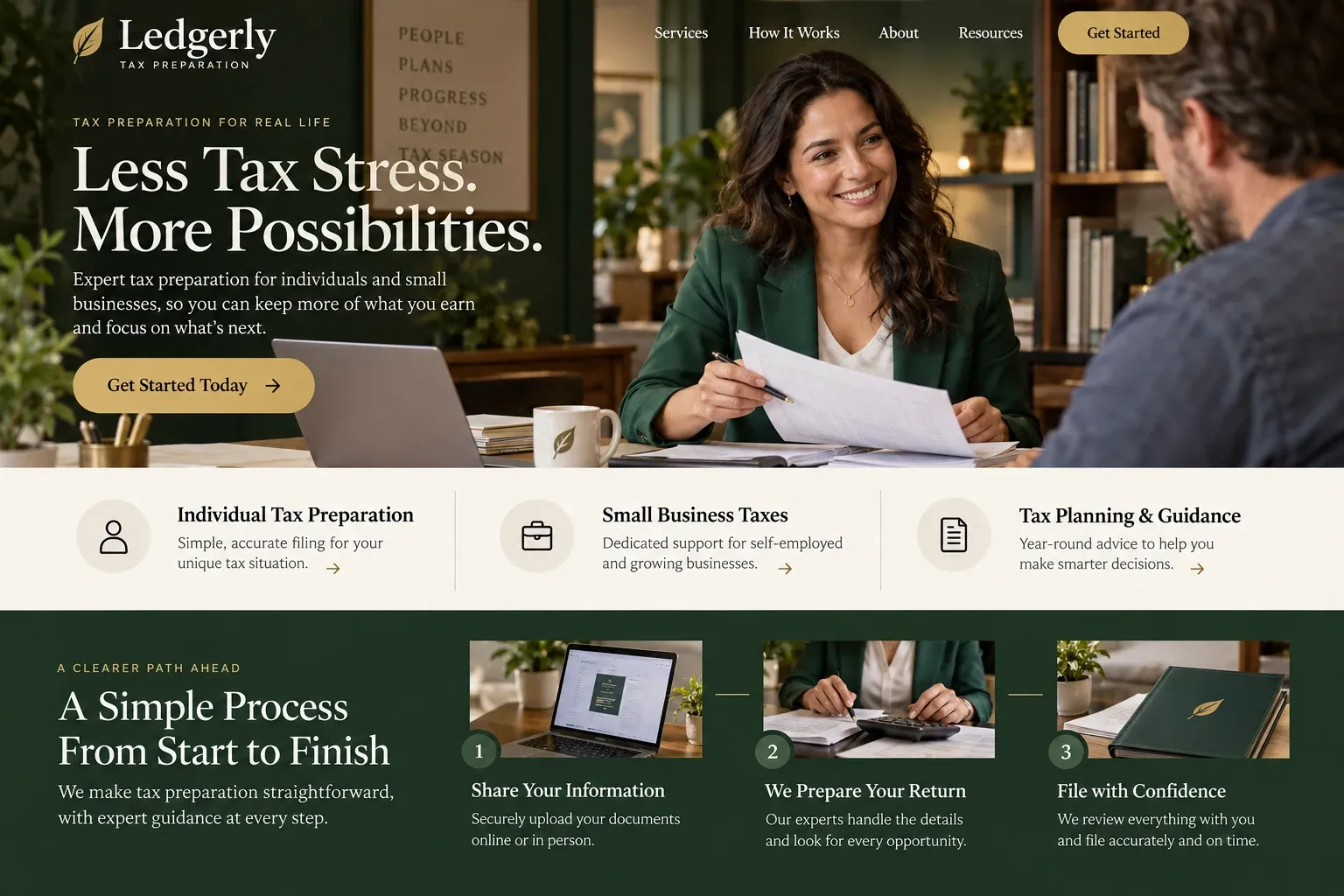
Fictional tax preparation services website homepage design concept
A design concept for a fictional brand. Your site is designed from scratch around yours.

Your customer's story

A new 1099 and a Tuesday evening

Luis drove for a rideshare app and delivered groceries on weekends last year, on top of his warehouse job. Now there is a W-2 on the kitchen counter, two 1099 forms in his email, and a form about health coverage he does not understand. The free software he used before keeps asking questions he cannot answer, so after dinner he searches "tax preparer near me open evenings".

The first site shouts about the biggest refund in town. The second has a phone number that rings to a full voicemail box. The third splits its services by kind of filer: employees, self-employed and gig workers, families, business owners. Under self-employed, it says exactly what to gather, from mileage notes to app earnings summaries, and offers evening appointments in person or by video.

He books a Thursday slot through its scheduling link and gets a checklist by email. The site never asks for his Social Security number; it tells him documents go through a secure upload link after booking. A tax preparer's website wins people like Luis by sorting them into the right appointment, telling them what to bring, and sounding calm instead of promising a windfall.

Why it matters

Why tax preparers need a website.

Tax preparation is seasonal, local, and crowded. Most clients search in a narrow window, often after work, and decide quickly between a storefront chain, a solo preparer, and doing it themselves. They want to know whether you handle their kind of return, when you are open, whether they can come in or file remotely, and what to bring. A social post from last April cannot answer that, and a directory listing rarely shows current hours.

We build tax preparation websites around the filer, not the form number. Each client category gets a page with what to gather and which appointment fits. Your booking tool is linked from every page, season hours sit at the top, and documents are routed to the secure upload portal you already use. The contact form asks for a name, phone, and kind of return, never for Social Security numbers or income figures.

What your customers search for

  • tax preparer near me
  • tax preparation Miami
  • tax office open saturday
  • self employed tax preparer
  • preparador de impuestos Miami
  • what documents do i need to file taxes

Your customers

What filers check before booking a tax preparer

  • Do you do my kind of return?

    Pages for each kind of filer you serve, such as employees, gig workers, landlords, families, and business owners, with the situations you handle and those you refer out.

  • When can I come in?

    Season hours, walk-in times if you take them, evening and Saturday availability, and a booking link that shows open slots without a phone call.

  • What should I bring?

    A printable checklist for each filer type, from W-2s and 1099s to last year's return and childcare receipts, so the appointment is not wasted.

  • Can I do this without coming in?

    A clear explanation of remote filing: booking a video or phone appointment, sending documents through your secure portal, and signing forms electronically.

What we build

What a website for tax preparers should include.

  • Filer category pages

    Separate pages for wage earners, self-employed and gig workers, families, rental owners, and business owners, each with a matching checklist.

  • Appointment booking link

    Your existing scheduling tool linked or embedded, with appointment types labeled so clients pick in-office, video, or drop-off.

  • Document checklists

    Printable lists of what to gather for each kind of return, written in plain words and available in Spanish.

  • Secure upload button

    A prominent link to the client portal your tax software provides, so documents never travel through the website form.

  • Season hours banner

    Current hours, walk-in times, and holiday or post-deadline changes at the top of every page, easy to update.

  • Year-round services page

    Amended returns, extensions, questions about IRS letters, and any bookkeeping you offer, so clients know you answer after April.

Planning guide

What does a tax preparation website need before filing season?

A tax preparer's website works hardest for a few months a year and should be ready before the first W-2s arrive. It needs to sort filers into the right appointment, tell them what to bring, and keep personal information off the open web. Here is how to plan the pages, the booking, and the local details.

Organize by filer, then by service

People recognize their situation faster than a service name. A page each for employees, self-employed and gig workers, families with dependents, rental property owners, and business owners lets visitors find themselves in one click. Each page should say what you prepare, what you do not handle and where you refer it, and which appointment type fits. Add an about page with your credentials, such as a PTIN, enrolled agent status, or CPA license, where you hold them.

Make the what-to-bring list impossible to miss

The most useful thing on a tax preparer's site is often a plain list of what to bring. Write one per filer type, offer it as a printable page, and send it automatically after booking if your scheduling tool allows. Show the office itself too: the front door, the parking, the waiting area, the people at the desks. A real photo of a real office reassures people who are handing over their most private paperwork.

Book appointments, collect documents separately

Let clients book themselves. Link or embed your scheduling tool and name the appointment types clearly: in-office, video, phone, or drop-off. Keep the general contact form to a name, phone, email, preferred language, and the kind of return. Never ask for Social Security numbers, income, or account numbers on it. Documents should go only through the secure portal your tax software provides, and the site should say that in one plain sentence.

Avoid refund promises in headlines and buttons. A preparer cannot know a refund before seeing the return, and visitors have learned to distrust those claims. Describe what you do instead: careful preparation, explanations in plain language, and a person to call if a letter from the IRS arrives later in the year.

Be easy to find when the rush starts

Tax searches spike in a short window and are heavily local: "tax preparer near me", "tax office open Saturday", "self-employed tax help". Keep your Google Business Profile hours current for the season, including any extended hours, and make sure they match the site. Give each filer type its own page, mention the neighborhoods you serve, and ask satisfied clients for a review after their return is filed. Update the site in the off-season so it never looks abandoned.

In your market

Tax season in South Florida

South Florida's tax clients are a mix: hourly and tip-earning workers, rideshare and delivery drivers, business owners, landlords with a condo or two, retirees, and new arrivals filing in the United States for the first time. Many prefer to do the whole appointment in Spanish or Haitian Creole. Florida has no state personal income tax, so most individual returns here are federal only. We write the filer pages around who walks through your door and can add a Spanish version of every page.

Questions

Questions tax preparers ask us.

Should a tax preparer's website let clients upload documents?

Only through a secure portal, never through the website form. Many professional tax programs offer a client portal, and we link to yours with a clear upload button. The site's own forms ask for contact details and the kind of return, which keeps Social Security numbers and income records out of ordinary email.

Can our tax office site handle walk-ins and appointments at the same time?

Yes. The home page can show walk-in hours and a booking button side by side, with a note on which works better for complicated returns. During the rush we can add a banner with extended hours or a message when appointments are full, and remove it after the deadline.

Is it a problem if our tax preparation site talks about refunds?

Describing what you do is fine; promising an outcome is not wise. We avoid lines like "biggest refund" or "maximum refund" and write about careful preparation, explaining results in plain language, and help with letters after filing. You approve every line, and anything you are unsure about stays out.

What should a tax preparer's site say after the April deadline?

That you are still open for business, if you are. A short page on extensions, amended returns, late filings, and questions about IRS letters tells clients where to turn in July. The season banner changes to off-season hours, and the booking link stays live for planning or bookkeeping appointments.

Let's talk

Ready for a website built for tax preparers?

Tell us about your business and we will come back with a clear recommendation and a fixed quote. No pressure, no jargon.

Trades we design for

See all 226 trades

226 trades

  • Plumbers website design concept
CallFree quote